
Introduction
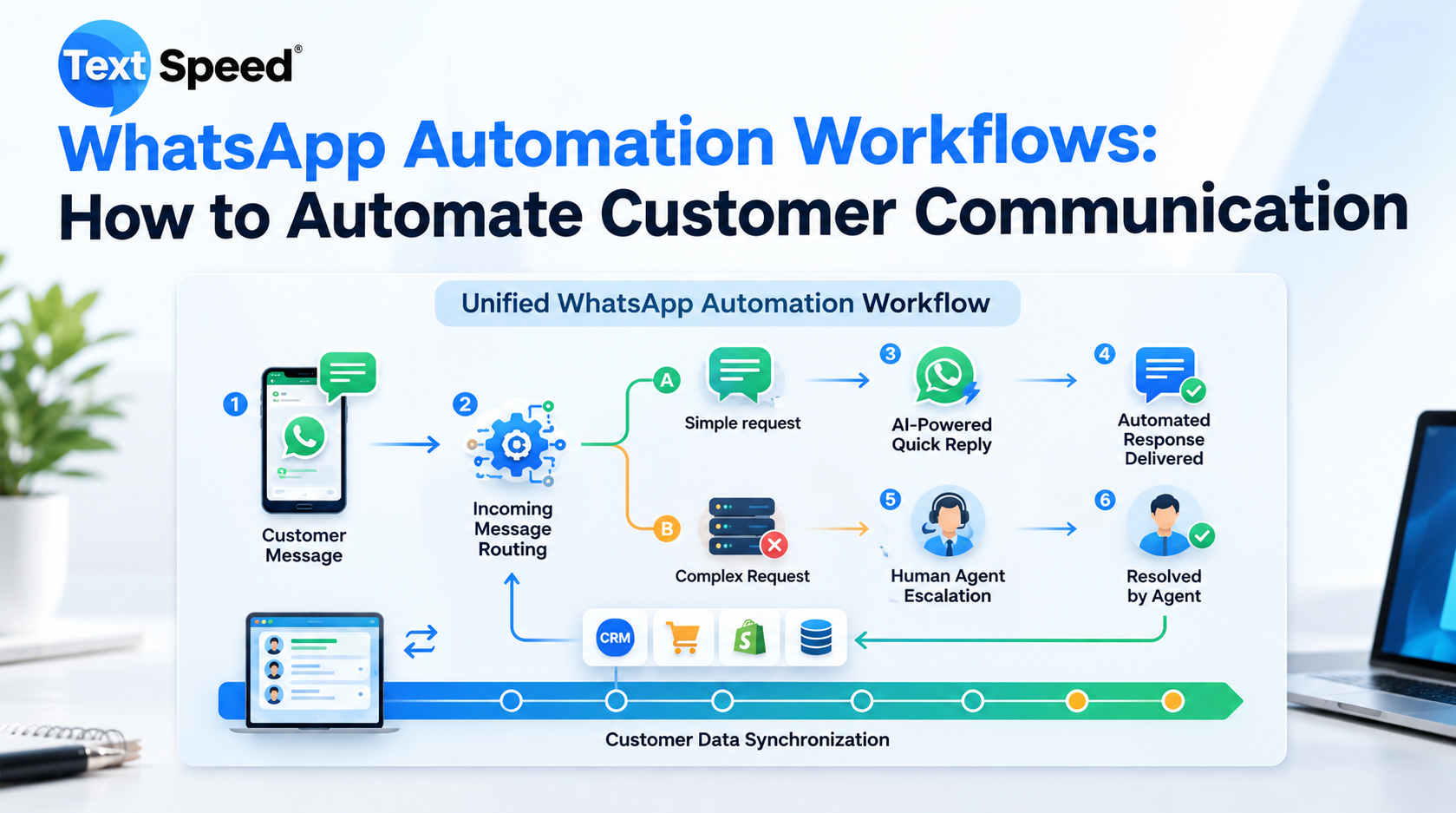
Customers expect businesses to respond quickly, especially when they contact a company through WhatsApp. Waiting hours for a reply can cause customers to lose interest, abandon an enquiry, or move to a competitor. This is where WhatsApp Automation can make everyday communication faster and more organized.
Instead of requiring employees to handle every conversation manually, businesses can create automated workflows that react to customer actions. A new enquiry, completed purchase, abandoned process, support request, or appointment can automatically trigger the appropriate WhatsApp message.
What Is WhatsApp Automation?
WhatsApp Automation is the process of using technology to send messages and manage customer interactions automatically based on predefined events, rules, or customer responses.
For example, when someone submits an enquiry form, the system can immediately send a WhatsApp confirmation. If the customer responds with a particular option, another message can be triggered based on that response.
This creates a structured conversation without requiring an employee to manually send every message.
How Do WhatsApp Automation Workflows Work?
A typical automated workflow can be divided into three simple parts:
Trigger: Something happens, such as a customer placing an order or submitting an enquiry.
Condition: The system checks information related to the customer or action.
Action: The appropriate WhatsApp message or workflow is triggered.
For example:
New lead → Lead details received → Welcome message → Product information → Sales follow-up
This approach allows businesses to design communication around actual customer journeys instead of sending the same message to everyone.
Useful WhatsApp Automation Workflows for Businesses
1. New Lead Follow-Up
When a prospective customer submits their details, an automated WhatsApp message can acknowledge the enquiry immediately.
The message could introduce the business, confirm that the enquiry was received, and provide the next step. This can help sales teams respond to leads while their interest is still fresh.
2. Order and Delivery Updates
E-commerce businesses can automate notifications throughout the purchase journey.
Customers can receive updates when an order is confirmed, dispatched, or delivered. This reduces the need for customers to repeatedly ask about their order status.
3. Appointment Reminders
Businesses such as clinics, salons, consultants, educational institutions, and service providers can use automated reminders to reduce missed appointments.
A workflow could send a reminder before the appointment and provide an option for the customer to confirm or reschedule.
4. Customer Support
Automation can handle simple and repetitive questions before a support executive becomes involved.
For example, customers could select:
1 — Order Status
2 — Pricing
3 — Talk to Support
The workflow can then direct the customer toward the appropriate information or team.
5. Abandoned Enquiry Follow-Up
Not every customer completes an enquiry or purchase on the first attempt.
Businesses can create a follow-up workflow that sends a timely reminder to customers who started a process but did not complete it. The message should be useful rather than repetitive or intrusive.
How to Build an Effective WhatsApp Automation Workflow
Successful automation starts with understanding the customer journey.
First, identify repetitive communication tasks that consume employees' time. Then determine what event should start each workflow.
Next, divide customers into meaningful groups. A new lead, existing customer, recent buyer, and inactive customer may require completely different messages.
After that, create concise message flows with clear actions. Avoid designing complicated conversations where customers have to navigate too many options.
Finally, monitor the workflow and improve it based on customer responses, delivery performance, engagement, and business outcomes.
Benefits of WhatsApp Automation
A well-designed WhatsApp Automation strategy can provide several practical benefits:
- Faster responses to customer enquiries
- Consistent communication
- Reduced repetitive manual work
- Better lead follow-up
- Automated customer notifications
- Improved support efficiency
- More organized customer journeys
- Easier communication at scale
Automation doesn't have to replace human interaction. Instead, it can handle predictable communication while employees focus on conversations that require personal attention.
How Textspeed Can Support WhatsApp Automation
Textspeed helps businesses build communication solutions around channels such as WhatsApp, SMS, RCS, email, and voice.
With Textspeed, businesses can explore automated WhatsApp communication for use cases such as lead follow-ups, customer notifications, support journeys, promotional communication, and business updates.
The goal is not simply to send more messages. Effective WhatsApp Automation should deliver the right message at the right stage of the customer journey while keeping the experience useful and relevant.
For businesses planning to connect WhatsApp communication with their existing processes, Textspeed can be considered as part of a broader customer communication strategy.
Final Thoughts
WhatsApp automation becomes valuable when it is designed around real customer behaviour. Rather than sending generic messages, businesses can create workflows that respond to specific actions and provide customers with timely information.
From capturing new leads to sending order updates and handling common support questions, automation can reduce repetitive work while keeping communication active.
The best approach is to start with a few high-value workflows, measure their performance, and gradually expand the automation as customer requirements become clearer.
FAQs
1. What is WhatsApp Automation?
It is the use of automated workflows to send WhatsApp messages or manage customer interactions based on predefined triggers and conditions.
2. Can WhatsApp Automation help with lead generation?
Yes. Businesses can automatically acknowledge new enquiries, share information, qualify leads, and trigger follow-ups.
3. Can automation handle customer support?
Yes. Automated workflows can answer common questions and route more complex conversations to human support teams.
4. Is WhatsApp Automation suitable for small businesses?
Yes. Small businesses can start with simple workflows such as enquiry responses, appointment reminders, and order updates.
5. How can Textspeed help?
Textspeed provides business communication solutions that can support WhatsApp-based automation alongside SMS, RCS, email, and voice communication.
Written by SEO Specialist
Telecom & CPaaS Technical Specialists · Reviewed for AccuracyOur content is authored by enterprise communications specialists and strictly reviewed for technical accuracy, regulatory compliance (TRAI/DLT), and industry best practices. Read our Editorial Policy to learn how we maintain trust.